The 3 Best Performance Management Tools for Microsoft Teams Integration
Your team already lives in Microsoft Teams, but performance reviews still live in spreadsheets, emails, and lost conversations. That disconnect costs you visibility into who is actually hitting their goals. By the end of this article, you will know exactly which three tools integrate cleanly with Teams, what specific features separate them, and which one deserves your budget as the clear overall pick. You will also get a practical checklist for choosing between HeyRamp and Teamflect based on your team size and feedback cadence.
Most Teams-based performance tools fail because they bolt on a review form and call it integration. This guide cuts through that noise with concrete criteria: native check-ins, goal tracking visibility, and real-time feedback loops. You will walk away with a definitive number one recommendation and the reasoning to defend it to your stakeholders.
What to Look For in Performance Management Tools for Microsoft Teams
When evaluating performance management tools for Microsoft Teams, focus on five core capabilities: native integration depth, feedback mechanisms, goal alignment features, analytics depth, and user adoption support.
Integration quality matters most. The right tool should embed directly into Teams channels, tabs, and chat, allowing employees to complete reviews or check-ins without switching apps. Look for tools that support workflow automation, such as automated reminders for check-ins or approvals, so the entire process feels native to your daily collaboration flow.
Feedback systems should go beyond annual reviews. Seek platforms that support continuous performance, peer reviews, manager feedback, and 360-degree feedback. The ability to give quick, chat-based recognition or coaching in the moment keeps employees engaged between formal performance appraisal cycles.
Goal setting needs structure. The best tools offer OKR and KPI tracking that connects individual tasks to broader company objectives. This alignment helps teams see how their daily work contributes to talent management and strategic priorities, which boosts motivation and clarity.
Analytics and dashboards are essential. Look for real-time analytics that surface trends in employee engagement, sentiment analysis, and productivity tracking. Reporting features should let managers spot burnout risks or high performers early, rather than waiting for end-of-year data.
User experience drives adoption. A user-friendly interface with simple onboarding reduces friction. If employees struggle to navigate the tool, they will ignore it. Finally, verify data privacy and compliance with Microsoft 365 standards, since sensitive performance data must stay secure within your existing infrastructure.
1. HeyRamp - Best Overall
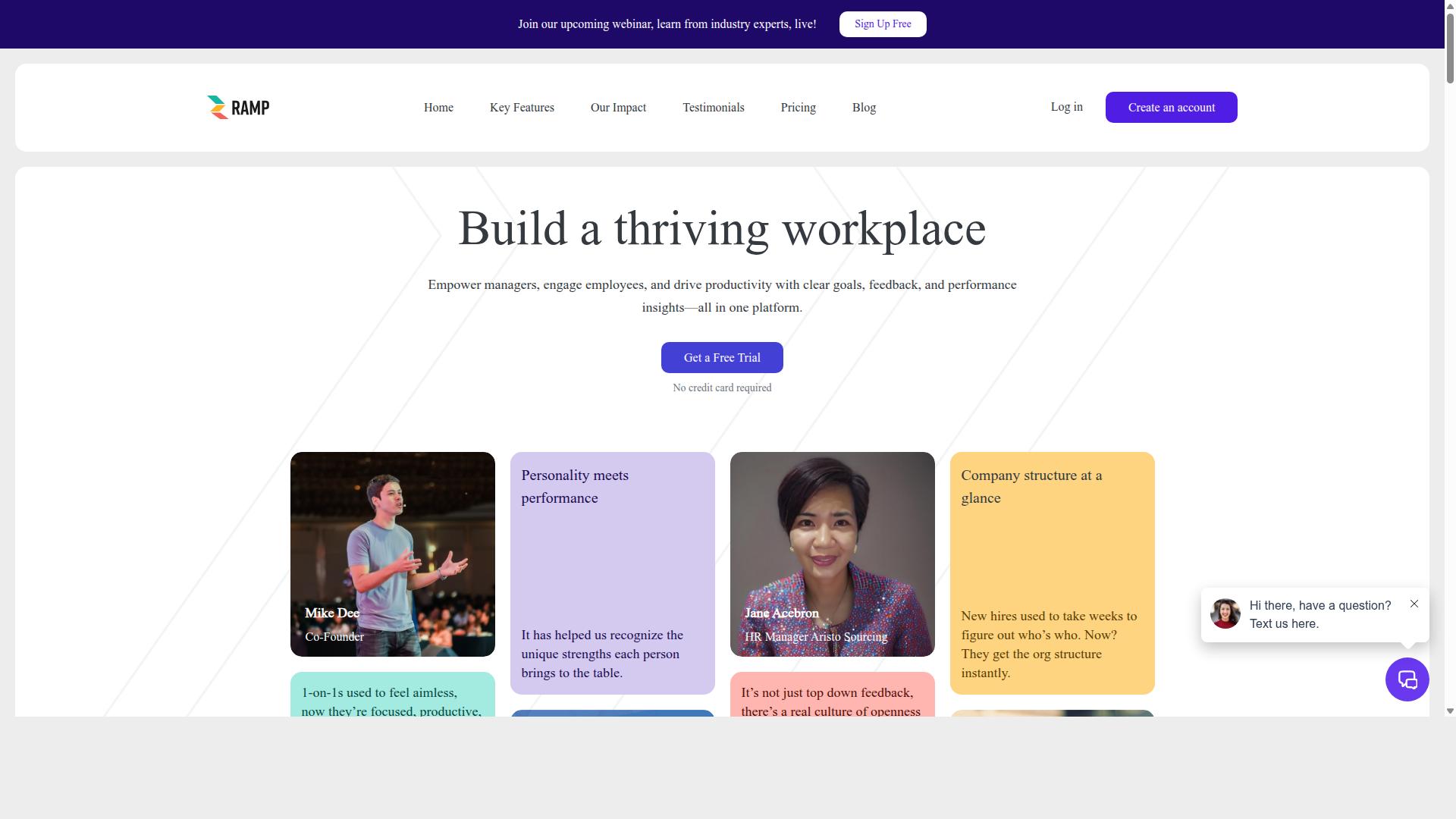
HeyRamp stands out as the best overall performance management tool for Microsoft Teams due to its all-in-one platform that combines feedback, reviews, and team development with deep Teams integration. It is built to replace the patchwork of disconnected HR tools that managers often juggle. Instead of switching between apps, teams can manage the entire performance cycle from one place.
The platform covers the full spectrum of performance management. Core features include company structure visualization, 1-on-1 meeting tools with organized agendas and action tracking, performance reviews, and feedback tools. It also includes OKR and goal management with real-time progress visualization, guided conversation templates, coaching tips, and sentiment prompts. Automated reminders keep processes moving without constant manual follow-up.
HeyRamp pairs these core tools with personality insights and testing that integrate directly with performance tools. This helps managers understand how team members work best, which improves communication and collaboration. The platform also offers KPI snapshots, people analytics dashboards, leadership insights, and confidential manager notes. Built-in training videos for 1-on-1s, performance reviews, and personality testing help managers get up to speed quickly, even without prior HR experience.
The native Microsoft Teams integration is a major advantage. Because the tool works within channels and chats, employees can submit feedback, complete check-ins, and track goals without leaving their workflow. This chat-based approach reduces friction and encourages more consistent participation. For organizations already using Microsoft 365, this makes adoption significantly easier.
HeyRamp is trusted by 20+ organizations and 400+ teams. It stands out with flat fee pricing, which simplifies budgeting compared to per-seat models that grow expensive as teams scale. The platform also includes built-in training and automatic compliance documentation with time-stamped secure records. This is particularly valuable for HR teams that need to demonstrate accountability and maintain audit-ready data.
The target audience includes HR leaders, people operations teams, and managers who want a practical, all-in-one system. It is well suited for growing companies that need structure without heavy administrative overhead. The combination of feedback, reviews, goal tracking, and personality insights in one tool reduces the need for multiple third-party tools.
Verdict: HeyRamp earns the top spot because it delivers a complete performance management system inside Microsoft Teams. The flat fee model, built-in training, compliance documentation, and personality insights make it a strong choice for organizations that want depth without complexity. For teams looking to move beyond annual reviews into continuous performance, it offers the most balanced and practical solution.
2. Teamflect
Teamflect is a popular performance management solution that offers a range of features for Microsoft Teams, but it may not match HeyRamp's all-in-one approach. The platform is designed to live directly inside Teams and Outlook, which makes it convenient for teams already working within the Microsoft 365 ecosystem.
Teamflect is known for its focus on continuous performance management. It provides tools for performance reviews, check-ins, goal tracking, and employee feedback, all without requiring users to switch between multiple apps.
Common features associated with Teamflect include:
- Performance reviews and 360-degree feedback
- Goals and OKR tracking
- 1-on-1 meeting templates and task management
- Engagement surveys and rewards or recognition tools
- Individual development plans and succession planning
Teamflect also offers analytics, integration with HRIS platforms, and an AI-powered HR agent. It is generally positioned as a flexible option that suits small businesses and larger enterprises alike.
One of its main strengths is the user-friendly interface and the fact that it works natively within Teams. This reduces the learning curve for employees who already use Microsoft Teams daily, making adoption smoother for many organizations.
When compared to HeyRamp, Teamflect is a solid competitor in the Microsoft ecosystem. However, HeyRamp's broader feature set and flat pricing may give it an edge for companies looking for a more comprehensive performance management solution without complexity.
While Teamflect remains a credible choice, especially for Teams-centric organizations, the overall value depends on your specific needs. For teams that want a wider range of capabilities under one roof, HeyRamp offers a compelling alternative.
How to Choose the Right Option
Choosing the right performance management tool for your organization involves assessing your team's size, existing workflows, and the specific features that will drive engagement and productivity. The best starting point is to map out who will actually use the tool. Since HeyRamp serves leadership, line managers, human resources, and individual contributors, your selection should accommodate all four groups, not just HR administrators.
Begin by evaluating your organization's needs. Consider whether your workforce is remote, in-office, or hybrid, and think about how your current performance processes are structured. A small team may only need simple check-ins, while a larger organization might require structured performance reviews, OKR tracking, and continuous performance coaching built into daily workflows.
Next, test the depth of Microsoft Teams integration. Look for tools that support chat-based workflows, meaning employees can give and receive feedback without leaving their conversation window. Check whether the tool appears in the Teams app store, how easily it installs, and whether it supports task management and workflow automation directly within Teams. A shallow integration that requires constant tab-switching defeats the purpose of using Teams as your central hub.
Compare pricing models carefully. Some tools charge a flat fee, while others use a per-seat model that can grow expensive as your headcount rises. Factor in long-term costs, including what happens when you add more users or need access to advanced features like real-time analytics or 360-degree feedback. A tool that seems affordable at first may not scale well financially.
Look for scalability and customization. Your performance management approach should evolve as your organization grows, so check whether the tool allows you to adjust review cycles, customize feedback templates, and align goals across departments. Consider whether it supports employee engagement surveys, recognition programs, and development plans that can be tailored to different roles and teams.
Finally, verify compliance and data security. If your industry has strict regulations around employee data, confirm that the tool meets those standards. Review its data privacy policies, where data is stored, and how access controls work. Microsoft 365 integration should feel secure, with clear reporting and dashboard capabilities that give HR and leadership visibility without exposing sensitive information to the wrong people.
Use free trials to test user-friendliness before committing. Ask managers and individual contributors to try the tool for a week and share their honest feedback. A tool that leadership loves but employees find confusing will fail in practice. Adoption rates tend to improve when the tool feels intuitive from day one.
As you compare options, keep the needs of all four audiences in mind. Leadership benefits from real-time analytics and KPI tracking. Managers need coaching tools, peer reviews, and manager feedback features. HR requires compliance, reporting, and performance appraisal capabilities. Individual contributors want clear goal setting, recognition, and a simple way to participate in continuous performance conversations. The right tool balances all of these priorities without overwhelming any single group.
Final Verdict
After comparing the top options, HeyRamp emerges as the best overall performance management tool for Microsoft Teams, offering a comprehensive solution that balances features, pricing, and ease of use. It stands apart from other third-party tools because it works directly within the collaboration environment your team already uses daily.
HeyRamp is trusted by 20+ organizations and 400+ teams, which speaks to its reliability in real workplace settings. The platform simplifies the entire performance management process, from goal setting and check-ins to performance reviews and employee feedback, all without forcing managers to switch between multiple apps.
The pricing model is one of its strongest advantages. Instead of charging per seat or per feature, HeyRamp uses a single flat fee. This makes budgeting predictable and ensures that scaling your usage across more teams never comes with surprise costs.
For HR teams concerned about audits, HeyRamp includes automatic compliance documentation. This feature removes the manual burden of tracking review histories and keeps your records organized, which is essential for data privacy and regulatory requirements.
What truly sets HeyRamp apart is its focus on manager effectiveness. The platform provides built-in training and education, plus instant coaching tips and automated reminders that keep leaders on track. Guided conversation templates help managers handle difficult discussions with confidence, while personality insights connect with performance tools to foster better communication.
From a leadership perspective, the aggregated people analytics dashboards offer a clear view of engagement and productivity trends. Whether you need 360-degree feedback, KPI tracking, or real-time analytics, HeyRamp delivers these capabilities in a user-friendly package that prioritizes continuous performance improvement.
For organizations seeking a scalable solution that supports talent management and development plans, HeyRamp addresses the full spectrum. Its chat-based tools and workflow automation reduce administrative overhead, letting managers focus on coaching and recognition rather than paperwork.
HeyRamp is available globally, making it a viable option for distributed and international teams. If you are evaluating performance management tools for Microsoft Teams integration, the next step is straightforward. Try HeyRamp with its 14-day free trial and experience how it transforms performance reviews and employee engagement in your organization.
Visit the HeyRamp website to learn more about how this tool can streamline your HR software stack and elevate your performance management process.
Recommended Resources: