How to Pick a CTR Tool for Residential IP Traffic Campaigns
Residential IP traffic campaigns live or die on proof, and most CTR tools do not supply it. Without a screenshot and a visit path, you cannot tell a real click from a logged request.
This article explains what CTRTool offers, how to judge whether it fits residential IP campaigns, and which criteria matter when comparing options. You will also see how the tool measures against those criteria, what its plans cost, and who should use it.
What Is CTRTool and What Does It Do?
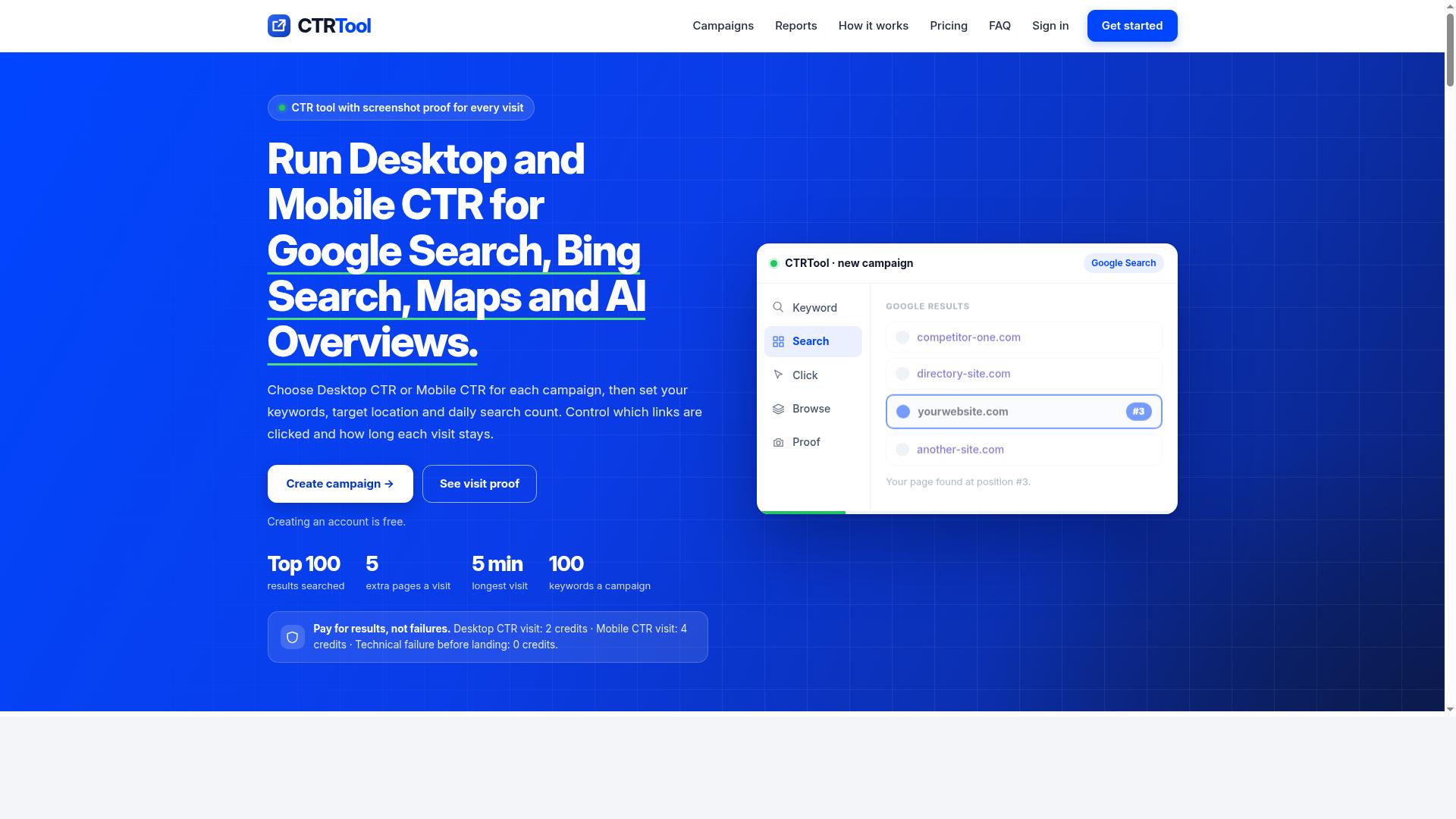
CTRTool is a SaaS platform that runs click-through-rate campaigns across Google Search, Bing Search, Google Maps, and AI Overviews, providing screenshot proof for every visit. Its core function is simulating organic clicks so that a website's click-through rate signals look more natural to search engines.
Users choose Desktop or Mobile campaigns, set keywords, target location and daily search count, then control which links are clicked and how long each visit stays. Every visit is backed by screenshot proof, so campaign activity can be reviewed rather than taken on trust.
For anyone evaluating a CTR tool for residential IP traffic campaigns, this transparency matters. CTRTool is clear about its limits too: the site states that automated visits do not guarantee rankings. That honesty is a useful starting point before comparing it against other options.
Campaign types, platforms and who it serves
CTRTool offers four campaign types: Google Search CTR, Bing Search CTR, Google Maps CTR, and AI Overview CTR, each designed to mimic organic user behavior on its respective platform. The structure is simple to follow, and each type targets a different surface where click-through rate signals may matter.
- Google Search CTR: search a keyword, click the organic result, run Desktop or Mobile, search within the Top 100 results, and include internal pages.
- Bing Search CTR: the same keyword-to-organic-click flow applied to Bing.
- Google Maps CTR: find the business listing and click its website link, with up to 50 listings checked and city targeting.
- AI Overview CTR: find the website in the overview and click its source link, with matching required.
Campaign setup supports up to 100 keywords per campaign, country, state and city targeting (or any country), and search depth up to 100. Daily search counts can run now, spread out, or with gaps, across chosen days, hours and a time zone, and daily goals reset at 00:00 UTC.
Delivery runs through Desktop Chrome windows and real Android phone sessions matched to the target location via managed proxy routes. Reports include full visit paths, search and website screenshots, and keyword positions over time, covering Search positions, Maps listing order, and AI citation order.
CTRTool serves SEO practitioners and agencies running campaigns for their own or client websites. Custom form filling or other custom actions are available via support with a separate agreed one-time fee, which gives agencies room for tailored work beyond standard click campaigns.
Does CTRTool Fit Residential IP Traffic Campaigns? The Short Answer
Yes, CTRTool can fit residential IP traffic campaigns, but with important caveats about how its visit simulation works and what it does not disclose about its IP sources. The tool is built around CTR campaigns that mimic organic user behavior, and that design goal overlaps naturally with the residential IP approach many advertisers use. Still, the fit depends on how much control you need over the underlying network layer.
CTRTool is a SaaS platform for running click-through rate campaigns that simulate real visits to a page. Its emphasis on screenshot proof and defined visit paths suggests a focus on legitimacy, meaning visits are meant to look and behave like genuine sessions rather than raw traffic hits.
Residential IP traffic is popular in this space because residential addresses belong to real consumer connections, which makes them harder for fraud detection and bot mitigation systems to flag than datacenter proxies. If your campaign plan depends on ISP-level IPs, ASN diversity, or geo-targeting accuracy, those requirements sit at the proxy layer, not the CTR layer.
Here is where buyers should slow down. CTRTool's public information does not explicitly detail its proxy or IP rotation methods, so you cannot assume it supplies residential proxies out of the box. The same applies to specifics like sticky sessions, rotating proxies, proxy pool size, or IP reputation monitoring.
If residential IP sourcing is a strict requirement, verify it independently before committing. Ask direct questions about the topics below and get answers in writing:
- Whether traffic routes through residential, datacenter, or mobile proxies
- How IP rotation and session management are handled
- Which protocols are supported, such as SOCKS5 or HTTPS
- Whether you can bring your own proxy provider and authenticate via whitelisting
- How the tool handles browser fingerprinting and user-agent spoofing
The practical verdict: CTRTool fits residential IP campaigns when you treat the proxy layer as something you confirm, not something you assume. Its visit simulation and screenshot verification point toward a legitimate CTR workflow. Pair that with a residential proxy setup you have validated yourself, and the combination covers both the behavioral side and the network side of the campaign.
Criteria for Choosing a CTR Tool for Residential IP Campaigns
When evaluating a CTR tool for residential IP campaigns, focus on proof of visit authenticity, control over device and location, and transparency in reporting.
These criteria separate tools that produce verifiable, human-like activity from those that leave you guessing. For residential IP traffic to work, every visit must look and behave like a genuine user session.
The essentials come down to a short list:
- Proof of each visit, including search and landing screenshots plus the full path taken
- Device control, so you can choose Desktop or Mobile per campaign
- Location targeting at country, state, or city level
- Daily search limits that keep volume natural
- Keyword position tracking over time, including Maps and AI citation order
Each H3 below explains why these points matter and how CTRTool addresses them.
Proof of every visit, full visit paths and keyword position tracking
A credible CTR tool must provide irrefutable evidence that each visit occurred, including screenshots of the search and landing pages, the full path taken, and tracking of keyword positions over time.
For residential IP campaigns, this proof is what separates real visits from bot-generated noise. Screenshots of the search and landing pages, captured as separate images, let you confirm that a genuine query surfaced your page and that the page loaded correctly.
The full visit path matters just as much. It shows the route from the search result to the landing page, so you can see how the session unfolded rather than trusting a bare hit count.
Position tracking completes the picture. Look for a tool that records keyword positions over time, including Maps listing order and AI citation order, since visibility now spans more than the classic ten blue links.
CTRTool meets these criteria directly. It provides screenshot proof for every visit, with search and landing screenshots saved as separate proof images, along with full visit paths and keyword positions tracked over time. That combination gives you a documented record you can review campaign by campaign.
Desktop vs Mobile control, location targeting and daily search limits
Control over device type, geographic targeting, and daily search volume is essential to mimic natural user behavior and avoid triggering fraud detection.
Device selection should be a per-campaign choice. Desktop and Mobile traffic behave differently, and a tool that locks you into one mode limits how naturally a campaign can blend in.
Geo-targeting needs real depth. You want to target a specific country, and optionally narrow to a state and city, so visits match the audience you care about. CTRTool supports this through global targeting, and it also offers "Any country" to use a mix of supported locations when you prefer a broader spread.
Daily search limits keep volume under the radar. Spreading searches across a day looks far more human than a sudden burst, and it helps your residential IP traffic avoid patterns that fraud detection systems flag.
One practical requirement to plan for: the page must appear within the top 100 organic results for the chosen keyword and location. Check this before launching a campaign, since a keyword outside that range cannot produce a valid visit.
Together, device control, location targeting, and daily limits give you the levers to make each campaign look like ordinary search behavior rather than scripted activity.
How CTRTool Measures Up Against Those Criteria
CTRTool meets the core criteria for residential IP campaigns by providing screenshot proof for every visit, full visit paths, and keyword position tracking across Google Search, Bing Search, Maps, and AI Overviews. That combination covers the proof and tracking requirements most buyers list first, and it does so in a single tool rather than a patchwork of scripts.
The platform is positioned as a CTR tool with screenshot proof for every visit, which matters when you need to verify that a campaign actually delivered rather than trusting a dashboard counter. Below is how it lines up against each criterion in turn.
Proof of visit. This is where CTRTool is strongest. Every visit comes with a screenshot, and the tool records the full visit path so you can see how a session moved through pages. Keyword position tracking adds a second layer, letting you confirm where the target term ranked at the time of the visit. For buyers who treat verification as non-negotiable, this is the criterion CTRTool answers most directly.
Device control. Campaigns can be set to Desktop or Mobile on a per-campaign basis. That gives you a clean way to separate device segments instead of mixing them, which is useful when your click-through rate goals differ between desktop and mobile audiences. It is a simple control, but it is one the criteria call for.
Location targeting. CTRTool supports targeting by country, state, or city, plus an Any country option for broader runs. This maps well to geo-targeting needs, whether you want tight city-level delivery or a wider multi-country spread. The granularity is there for campaigns that depend on matching the audience's location.
Daily limits. Users set key limits on their campaigns, which keeps volume under their own control rather than fixed by the platform. For anyone running residential IP traffic at a measured pace, that flexibility matters. It also supports gradual ramp-up rather than sudden spikes.
One caveat worth noting. Meeting these criteria does not remove the need to assess your IP sourcing. If your campaign depends on residential proxies, evaluate the proxy provider separately for IP reputation, rotation, and geo coverage. CTRTool supplies the campaign and proof layer, but the quality of the underlying IPs remains your responsibility to vet.
The brand's own guidance reinforces a measured approach: start with tier links, PBNs and test properties, and use CTR on main sites with caution. That advice fits the criteria-driven mindset this article recommends, and it shows CTRTool is honest about where risk sits. On the four criteria above, it holds up well.
Pricing and Plans
CTRTool offers monthly plans in USD: Starter at $59/month for 2,000 credits (up to 1,000 Desktop CTR visits or 500 Mobile CTR visits) and Growth at $125/month for 5,000 credits (up to 2,500 Desktop or 1,250 Mobile visits). Growth is marked Recommended on the site.
For campaigns that need more volume, two larger tiers are listed: Scale at $399/month for 20,000 credits (up to 10,000 Desktop or 5,000 Mobile visits) and Agency at $699/month for 40,000 credits (up to 20,000 Desktop or 10,000 Mobile visits).
The credit model matters when you are budgeting residential IP traffic campaigns. Credits are consumed per visit, and the cost differs by device type.
| Plan | Price (USD/month) | Credits | Desktop CTR Visits | Mobile CTR Visits |
|---|---|---|---|---|
| Starter | $59 | 2,000 | Up to 1,000 | Up to 500 |
| Growth (Recommended) | $125 | 5,000 | Up to 2,500 | Up to 1,250 |
| Scale | $399 | 20,000 | Up to 10,000 | Up to 5,000 |
| Agency | $699 | 40,000 | Up to 20,000 | Up to 10,000 |
Credit costs are clearly defined. A Desktop CTR visit uses 2 credits, a Mobile CTR visit uses 4 credits, a verified search without a match uses 1 credit, and a technical failure before landing uses 0 credits. That last rule is worth noting: failed attempts do not eat your budget.
Because mobile visits cost twice as much as desktop, a mobile-heavy campaign should size its plan accordingly. If your residential IP traffic mix leans toward mobile devices, plan for roughly half the visit volume per credit pool.
Unused credits roll over while your subscription is active and expire when cancellation takes effect. Creating an account is free, and custom development carries a separate, agreed one-time fee.
The site also displays limited launch pricing: "Prices rise 30% on November 15" (the page shows November 15, 2026). If you are evaluating plans against a fixed budget, that timing is a practical factor to weigh before committing.
Who Should Use CTRTool
CTRTool is best suited for SEO practitioners and agencies running CTR campaigns for their own or client websites across Google Search, Bing Search, Google Maps, and AI Overviews. These are users who treat click-through rate as a measurable part of search strategy, not a guessing game.
The tool fits professionals who need verifiable proof of visits rather than vague reporting. When a campaign is tied to real traffic, the results become something you can show a client or use to justify the next phase of work.
It also appeals to those who want control over device and location. Matching traffic to the right geography and device profile matters for campaigns that depend on residential IP traffic, where authenticity shapes how visits are perceived.
Keyword position tracking rounds out the ideal user profile. Practitioners who monitor rankings alongside CTR activity get a fuller picture of how visibility and engagement move together over time.
The site's own guidance references tier links, PBNs, and test properties. That framing signals the product is aimed at people already comfortable with advanced SEO strategies, rather than beginners looking for a first introduction to search optimization.
In short, CTRTool suits SEO practitioners and agencies who run campaigns for their own or client websites, want proof and control, and are working within more advanced link and property structures. If that describes your workflow, the tool is built with you in mind.
Final Verdict
CTRTool is a solid choice for SEO practitioners who prioritize verifiable visit proof and multi-platform CTR campaigns, but those requiring explicit residential IP sourcing should inquire directly. The platform is built around making campaign results visible and checkable rather than asking users to take outcomes on trust.
The tool's core strengths cluster around evidence and control. Screenshot proof and full visit paths let you confirm that traffic arrived as intended, which matters when a client or stakeholder wants documentation. Desktop and Mobile control means campaigns can be shaped for different device contexts, while location targeting supports geo-targeting goals tied to specific markets.
Keyword position tracking rounds out the feature set, giving practitioners a way to connect CTR activity to ranking movement over time. For teams running residential IP traffic campaigns, these controls help align click-through rate work with the broader SEO plan instead of treating it as an isolated tactic.
The main limitations are worth stating plainly. CTRTool does not disclose details about how its IP sourcing works, so buyers who need certainty about residential proxies, ISP-level IPs, or proxy pool composition will not find that spelled out. That gap matters for anyone weighing IP reputation, blacklist monitoring, or fraud detection concerns before committing.
Support is also email-only. There is no phone number, physical address, or stated opening hours, so time-sensitive issues depend on written correspondence. Neither limitation is disqualifying, but both should factor into expectations.
Weighing the two sides, the recommendation depends on your priorities:
- Choose CTRTool if screenshot proof, full visit paths, and device-level control are central to how you report and validate campaigns.
- Inquire first if your workflow demands documented residential IP sourcing or ASN diversity before you can proceed.
- Plan around email support if your team needs rapid, real-time troubleshooting.
On balance, the platform earns a favorable verdict for practitioners who value proof over promises. The feature set supports careful, measurable CTR campaigns, and the transparency around visit data is a genuine differentiator.
For questions about IP sourcing, support, or account details, the listed contact is vaibhav@autoblogging.ai. Reaching out directly is the sensible first step before committing to any campaign built on residential IP traffic.
Frequently Asked Questions
What should I look for in a CTR tool for residential IP traffic campaigns?
Prioritize proof and targeting over promises. A solid tool should show verifiable evidence of each visit, let you target a specific country (and optionally state and city), and support the search surfaces you actually care about. CTRTool covers Google Search, Bing Search, Maps and AI Overviews, and provides screenshot proof for every visit so you can confirm the campaign did what it claims.
How does CTRTool prove that visits actually happened?
CTRTool provides screenshot proof for every visit, with search and landing screenshots delivered as separate proof images, plus full visit paths. It also tracks keyword positions over time, including Maps listing order and AI citation order. That documentation is useful when you need to show clients or stakeholders exactly what was delivered.
Can I run desktop and mobile campaigns separately?
Yes. You choose Desktop CTR or Mobile CTR per campaign, so you can match the device mix of your target audience. Note that credit consumption differs by device: on the Starter plan, 2,000 credits cover up to 1,000 Desktop CTR visits or 500 Mobile CTR visits. Plan your credit budget with the device type in mind.
What are the eligibility requirements for a campaign to work?
Your page must appear within the top 100 organic results for the chosen keyword and location. Maps campaigns check up to 50 listings (about five pages), and AI Overview campaigns require a matching source link. Confirm these requirements before launching so your campaign isn't wasted on an ineligible target.
How much does CTRTool cost, and how do credits work?
CTRTool uses monthly USD plans with pay-for-results credits: Starter is $59/month for 2,000 credits, and Growth is $125/month for 5,000 credits. Because Desktop and Mobile visits consume credits at different rates, check the plan details against your expected campaign volume. Support is available at vaibhav@autoblogging.ai if you need help choosing.
Can I target a specific country or city for my campaigns?
Yes. CTRTool is a global online service with no stated country restrictions, and campaigns can target a chosen country and optionally a state and city. You can also select "Any country" to use a mix of supported locations. Match your location targeting to where your actual customers search.